
Pricing guide
Data Studio agency pricing: how agencies charge and how to compare quotes
Data Studio agency pricing usually follows one of three models: a fixed fee per dashboard, a monthly retainer, or a per-client fee for white-label reporting. This guide is for marketing agencies, ecommerce brands and finance or operations teams who are collecting quotes and want to read them properly. We explain each model, the work that sits behind the number, the running costs that arrive after launch, and how our own team prices projects.

Quick answer
How do Data Studio agencies price their work?
Data Studio agency pricing usually follows three models: a fixed fee per dashboard, a monthly retainer for ongoing reporting, or a per-client fee for white-label work. The price depends on sources, data quality, page count, connectors and BigQuery modelling, plus running costs such as partner connectors and Data Studio Pro licences.
- Agencies price Data Studio work per dashboard, as a monthly retainer, or per white-label client.
- Data preparation and source count shape the quote more than the visible charts do.
- Connector subscriptions, BigQuery usage and Pro licences are separate from the agency's fee.
- Compare quotes on the same written scope, ownership terms and support period.
What pricing models do Data Studio agencies use?
Most agencies use one of three structures, and many combine them. A one-off build is usually priced per dashboard, ongoing reporting sits on a retainer, and agencies that resell reporting to their own clients often pay per client account.
Each model shifts risk differently. A per-dashboard fee puts the risk of overruns on the agency. A retainer gives you a predictable monthly cost but needs a clear list of what is included. A per-client white-label fee scales with your client base, which suits agencies but can become expensive if the template never changes.
Hourly billing still appears, mostly for small fixes and advisory calls. It is the hardest model to compare across suppliers, because two teams can take very different amounts of time for the same task. For anything larger than a quick fix, ask for the work to be priced as a fixed deliverable instead.
| Model | How it is charged | Best fit | Watch out for |
|---|---|---|---|
| Per dashboard | Fixed fee for an agreed scope | A defined build or rebuild | Scope gaps such as data cleaning left out |
| Monthly retainer | Recurring fee for a set level of support | Ongoing changes, new pages, monitoring | Vague inclusions and unused hours |
| White-label per client | Fee per client report or account | Marketing agencies reporting for their clients | Costs scaling faster than the work |
| Hourly | Time billed as used | Small fixes and advisory calls | Hard to forecast, hard to compare |
What is included in a per-dashboard price?
A per-dashboard price should cover discovery, data connection, preparation, design, testing and handover. If a quote only describes pages and charts, ask what happens to the data before it reaches them.
For example, a retail dashboard that tracks month-on-month and quarter-on-quarter revenue growth, conversion rate, sell-through rate and online versus in-store sales draws on several systems. The visible pages are the last step. Before them, someone has to align store codes, product categories and date formats, and build the calculated fields that define each metric.
- Discovery: agreeing metrics, audiences and the decisions the dashboard supports.
- Connection: native connectors, partner connectors, Sheets, databases or BigQuery.
- Preparation: cleaning, mapping tables, calculated fields and CASE logic.
- Design: page layout, filters, parameters and drill-downs.
- Testing: reconciling totals against the source systems.
- Handover: ownership transfer, documentation and a walkthrough.
How do Data Studio reporting retainers work?
A retainer pays for continuing capacity rather than a single deliverable. Typical inclusions are new pages, changes to existing reports, fixing broken connectors, adjusting to platform changes and answering questions from the people who read the reports.
Retainers make sense because Data Studio reports rarely stay still. Platforms deprecate fields, as happened when Google Ads location extension fields were sunset on May 4, 2026. GA4 properties hit API quotas as more people open the report. Data Studio gives no warning when a connector breaks, so someone needs to notice and fix it. A retainer turns that into a planned cost instead of a surprise.
Retainers also cover the people side of reporting. New managers join and ask for a view of their region, a finance lead wants actual versus forecast added, or a client asks why a figure differs from the platform. A good retainer budget absorbs these requests without a new quote each time.
Before signing, ask for the list of included tasks, the response time for broken reports, and what happens to unused capacity at the end of the month.
How is white-label Data Studio reporting priced?
White-label reporting is usually priced per client because the work scales with the number of client accounts. Each client adds data sources, credentials, scheduled deliveries and a set of checks, even when the template is shared.
The real cost in white-label work is not the first template but the operations around it. Data Studio has no built-in client management for agencies, so each new client means copying a template, swapping data sources, checking credentials and setting delivery schedules. Agencies that do this well build a repeatable process, and that process is what you are buying.
Ask whether the per-client fee covers onboarding new clients, ongoing monitoring and branding changes, or only the initial copy of the template.
What moves Data Studio agency pricing up or down?
Five variables account for most of the difference between a modest quote and a large one. Two dashboards that look alike on screen can differ several times over in the work behind them.
Industry matters as well. A manufacturing dashboard that tracks units produced and lost, units lost per machine, operator availability and maintenance cost depends on production logs that are often kept in spreadsheets by shift. A procurement view of spend by category and country, supplier lead times and suppliers at risk depends on clean supplier master data. In both cases most of the effort goes into shaping the data, and the agency quote should say so.
- Source count: blends are limited to 5 sources and equality joins, so larger models move into Sheets or BigQuery.
- Data quality: exported .xls files with shifting layouts take far more work than a clean API connector.
- Table width: fixed-schema sources such as GA4 and Google Ads cap tables at 10 dimensions and 20 metrics, which shapes the design.
- Volume: large queries can trigger too many rows errors and need aggregation or a warehouse.
- Audience and access: many viewers, client-specific access or row-level needs add design and testing time.
What running costs sit outside the agency's fee?
Data Studio is free for creators and viewers, but three running costs often appear on a separate bill. Budget for them before comparing agency quotes, because a low build fee can hide high monthly costs.
Partner connectors from vendors such as Supermetrics, Windsor.ai, Porter Metrics, Funnel, Power My Analytics and Catchr bring in data Google does not connect natively. Their prices change, so check them with the vendor directly. BigQuery charges for storage and queries, and well-partitioned tables keep that bill small. Data Studio Pro is $9 per user per project per month for creators, editors and managers in Pro workspaces, while viewers need no licence.
| Running cost | Who charges it | How to keep it under control |
|---|---|---|
| Partner connectors | The connector vendor | Use native connectors where possible, consolidate accounts |
| BigQuery storage and queries | Google Cloud | Partition by date, aggregate, avoid scanning full tables |
| Data Studio Pro | Google, $9 per user per project per month | License only creators, editors and managers |
| Agency retainer | The agency | Agree inclusions and response times in writing |
How should you compare Data Studio agency quotes?
Put every quote on the same written scope before comparing numbers. A quote that is cheaper because it leaves out reconciliation, documentation or ownership transfer is not cheaper, it simply moves cost to later.
Compare at least these points side by side: the sources and pages included, how data preparation is handled, who owns the reports and data sources, how totals are checked against the source systems, the support period after launch, and which running costs you will carry.
- Is ownership of reports and data sources transferred to your account?
- Are partner connector and BigQuery costs shown separately?
- Is there a reconciliation step with named source totals?
- Is documentation of calculated fields and blends included?
- What does support cost after the first month?
How does Greenwolf Tech Labs price Data Studio work?
We quote a fixed price after a free review. In the review our team looks at your sources, a sample of the raw data, any existing reports and the decisions the dashboards must support. The quote then lists what we build, what we hand over and what running costs you should expect.
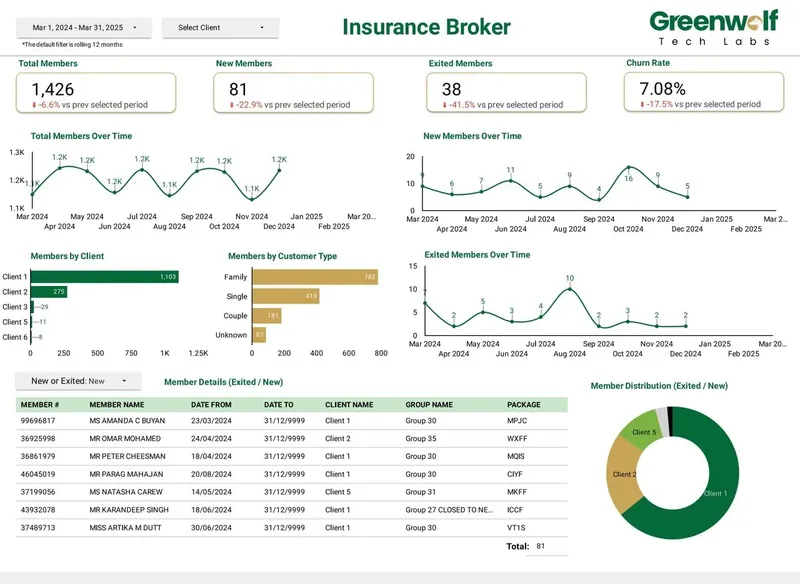
We have delivered 100+ projects for 200+ clients, and our team includes people with experience from top consulting firms. For an Australian insurance brokerage working from messy insurer files, our automated pipeline cut report preparation from 4 to 5 hours to under 5 minutes and lifted reporting accuracy from about 75% to 99%. That kind of result comes from pricing the data work honestly, not from hiding it.
Case study · Insurance brokerage, Australia
From 4-5 hours of spreadsheet work to a report in under 5 minutes
Monthly reports were assembled by hand from inconsistent .xls files sent by several insurers. The files now land in Google Drive, are mapped into one central sheet with the business rules applied, and feed a Data Studio dashboard.
- Report time: 4-5 hours to under 5 minutes
- Reporting accuracy: about 75% to 99%
- Visibility across insurers: limited to real time, with filters
FAQ
Frequently asked questions
How much does a Data Studio agency charge?
Agencies charge per dashboard, as a monthly retainer, or per client for white-label work. The amount depends on sources, data quality, page count, connectors and whether BigQuery is involved. Ask for a fixed quote against a written scope so you can compare offers fairly.
Is a retainer better than a one-off Data Studio project?
A one-off project suits a defined build. A retainer suits teams whose reports change often or depend on connectors that break, because Data Studio gives no warning when a connector fails. Many teams start with a project and add a retainer once the reports are in daily use.
Do I have to pay for Data Studio itself?
No. Building and viewing reports in Data Studio costs nothing. Data Studio Pro costs $9 per user per project per month and is only needed for teams that want workspaces, organisation-owned content or advanced scheduling. Viewers never need a Pro licence.
Why are white-label Data Studio reports priced per client?
Each client adds its own data sources, credentials, delivery schedules and checks, even when the template is shared. Data Studio has no built-in client management, so the agency runs that process for every account.
Does Greenwolf Tech Labs publish a price list?
No. We quote a fixed price after a free review of your sources and goals, because the work depends heavily on the data. The quote lists deliverables, handover and expected running costs.
What running costs should I budget for besides the agency fee?
Plan for partner connector subscriptions if you report on platforms Google does not connect natively, BigQuery storage and query charges if your data lives there, and Data Studio Pro licences if your team needs them. Connector vendors set and change their own prices, so check them directly.
Keep reading
Related pages
Get started
Tell us what your reporting has to do
Describe the dashboards you need, who reads them and where the data sits. We reply within one business day with an approach, the connectors involved and a fixed-price plan.
- Free 30-minute reporting review
- Fixed quote before any work starts
- Everything built and owned in your Google account
Prefer email? info@greenwolftechlabs.com
Get a free proposal
Two lines is enough to start.