
Migration
Migrate to Data Studio without losing the numbers people trust
We help companies migrate to Data Studio from spreadsheet decks, Power BI, Tableau and older reporting tools, and move scattered personal reports into team workspaces the company owns. It is for teams that want lower licence costs or easier sharing, and we will also tell you plainly when moving is the wrong call.
Quick answer
How do you migrate to Data Studio from another reporting tool?
To migrate to Data Studio, you inventory the existing reports, decide which are still used, rebuild the data logic in Sheets or BigQuery rather than inside charts, then recreate the dashboards and reconcile every key number against the old version before switching users over. Unused reports are retired, not migrated.
- We inventory first, and usually retire a share of reports nobody opens.
- Data logic moves to Sheets or BigQuery, not into hundreds of chart formulas.
- Every migrated number is reconciled against the old report before switch-over.
- Some teams should not move, and we say so during the free review.
Why do companies migrate to Data Studio?
Usually for cost, sharing or reach. Data Studio is free to build and view, and Data Studio Pro costs $9 per user per project per month for creators only, because viewers need no licence. For a company where fifty people read reports and five build them, that changes the licence bill considerably.
Sharing is the other reason. Data Studio reports open in a browser with a Google account, connect natively to GA4, Google Ads, Search Console, Sheets and BigQuery, and can be sent by scheduled email. Teams already working in Google Workspace and Google Cloud find that their reporting fits where the rest of their work already lives.
How do you move from Excel and Sheets decks?
We automate the monthly assembly first, then build the dashboard on the result. Most spreadsheet reporting is a routine: download files, paste them into tabs, fix formats, update formulas, copy charts into slides.
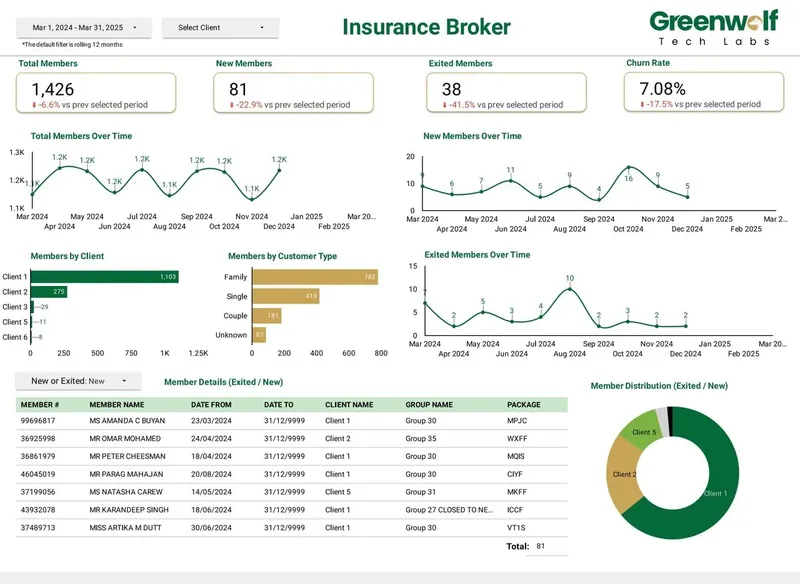
We replace each step. Files land in Google Drive, are mapped into a central structured sheet or BigQuery table, and business rules are applied automatically. For an Australian insurance brokerage receiving messy .xls files from several insurers, this cut report time from 4 to 5 hours to under 5 minutes and lifted reporting accuracy from about 75% to 99%, with real-time visibility across insurers through filters.
What you get
What we build
Scoped and quoted at a fixed price after a free review.
Report inventory
Every existing report listed with owner, usage, sources and a migrate, merge or retire decision.
Data layer
Business logic rebuilt in BigQuery or structured sheets so reports read clean tables.
Rebuilt dashboards
Migrated reports in Data Studio, redesigned where the old layout did not translate.
Workspace structure
Pro team workspaces with roles and company ownership, where Pro is used.
Reconciliation log
Old and new figures compared for each key metric, with differences explained.
Switch-over plan
Parallel run, user communication and retirement of the old reports.
What changes when you migrate from Power BI or Tableau?
The data model has to move out of the BI tool, because Data Studio does not hold one. Power BI datasets with DAX measures and Tableau extracts with calculated fields carry logic that Data Studio expects to find in the source.
So we rebuild that logic in BigQuery views or tables, or in a structured sheet for smaller cases, then recreate the reports on top. Some things translate directly, such as filters, scorecards, time series and pivot tables. Others need redesign: complex cross-table measures become pre-calculated columns, and row-level security becomes viewer's credentials on BigQuery with row rules. We map each report and flag what will look or behave differently before work starts.
How do you move personal reports into company-owned workspaces?
We move them into Data Studio Pro team workspaces so they belong to the company, not to whoever built them. In the free edition, every report and data source is owned by an individual Google account, and when that person leaves, reports and credentials can break.
Pro ties content to a Google Cloud project with IAM, and team workspaces have Manager, Content Manager and Contributor roles. We inventory reports across the people who built them, agree a workspace structure by team or function, transfer ownership, reset data source credentials to service or shared accounts, and update schedules. Reports built under the old Looker Studio name already moved to Data Studio automatically in April 2026, so the work here is ownership and structure, not conversion.
When should you not migrate to Data Studio?
When the current tool does something your business depends on that Data Studio is not designed for. We would rather lose a project than move a team backwards.
Signs that staying put, or choosing a different tool, is the better answer:
- You need a governed semantic layer across many teams; that is what Looker, a separate enterprise BI product, is for.
- Your Power BI model holds hundreds of interdependent DAX measures and the team maintaining it is happy.
- Your spreadsheet is really a planning model with what-if inputs, not a report.
- Your company runs on Microsoft 365 and Azure with no Google footprint.
- Reports are rarely used and cost little: retiring them may beat moving them.
How do you make sure nothing is lost in migration?
We reconcile before we switch. For each migrated report, we pick the key numbers, run old and new side by side for at least one closed period, and explain every difference before users move.
We also run old and new in parallel for a short period, so people can compare and raise questions while the old report is still available. Only after sign-off do we retire the original, archive it and redirect users. Documentation records where each old metric now lives and how it is calculated.
Which reports should be migrated first?
Start with the reports people open every week and that cost the most effort to produce. Those deliver value fastest and build confidence in the new setup.
In practice that is often the monthly management pack, the marketing performance report and one operational dashboard. Reports used once a quarter, or by one person, come later or are merged into others. During the inventory we look at view history where the old tool provides it, ask owners which reports they would miss, and sort everything into three groups: migrate now, merge into another report, or retire. In most inventories, the retire group is larger than people expect, which shortens the project.
Case study · Insurance brokerage, Australia
From 4-5 hours of spreadsheet work to a report in under 5 minutes
Monthly reports were assembled by hand from inconsistent .xls files sent by several insurers. The files now land in Google Drive, are mapped into one central sheet with the business rules applied, and feed a Data Studio dashboard.
- Report time: 4-5 hours to under 5 minutes
- Reporting accuracy: about 75% to 99%
- Visibility across insurers: limited to real time, with filters
How it works
How a project runs
- 01
Free review
We look at your current tool, reports and usage, and tell you honestly whether to move.
- 02
Inventory
We list every report and agree which to migrate, merge or retire.
- 03
Rebuild
We move data logic to the data layer and rebuild reports in Data Studio.
- 04
Reconcile
We compare old and new figures and resolve every difference.
- 05
Switch over
We run both in parallel, move users and retire the old reports.
FAQ
Frequently asked questions
Can Power BI reports be imported into Data Studio?
No, there is no direct import. Reports are rebuilt, and the data logic held in Power BI datasets is moved into BigQuery or a structured sheet first.
Can Tableau dashboards be converted to Data Studio?
Not automatically. We recreate them in Data Studio, moving calculated fields and extract logic into the data layer, and flag any visual that needs a different design.
Do Looker Studio reports need to be migrated to Data Studio?
No. Google renamed the product in April 2026 and moved existing reports, data sources and users automatically. Old links redirect to datastudio.google.com.
What happens to reports when an employee leaves?
In the free edition, reports owned by that person's account can lose access or credentials. Data Studio Pro team workspaces keep content owned by the company through a Google Cloud project.
Is Data Studio cheaper than Power BI or Tableau?
Data Studio is free, and Pro is $9 per user per project per month for creators only, since viewers need no licence. Compare that with your current per-viewer costs, plus the one-time migration effort.
Should we migrate to Data Studio or to Looker?
It depends on what you need. Data Studio suits self-service reporting and ad hoc exploration, while Looker is Google's enterprise BI platform built on governed semantic models. Most mid-size teams we speak to need Data Studio.
How long does a migration take?
It depends on how many reports are still used and where their logic lives. We give a fixed timeline and price after the inventory in the free review.
Keep reading
Related pages
Get started
Tell us what your reporting has to do
Describe the dashboards you need, who reads them and where the data sits. We reply within one business day with an approach, the connectors involved and a fixed-price plan.
- Free 30-minute reporting review
- Fixed quote before any work starts
- Everything built and owned in your Google account
Prefer email? info@greenwolftechlabs.com
Get a free proposal
Two lines is enough to start.