
Pricing guide
Data Studio pricing in 2026: what is free, what Pro costs and what you will really pay
Data Studio pricing is simple on paper: building and viewing reports is free, and Data Studio Pro costs $9 per user per project per month for the people who create and manage content. The real bill comes from everything around the tool: partner connectors, BigQuery, Pro seats you forgot to remove, and the hours someone spends keeping reports correct. This guide is for marketing agencies, ecommerce brands and finance or operations teams who want to budget for Data Studio properly before they commit.

Quick answer
How much does Data Studio cost?
Data Studio is free for everyone who builds or views reports. Data Studio Pro costs $9 per user per project per month, and only creators, editors and managers in Pro workspaces need a licence. Viewers never pay. Most real costs come from partner connectors, BigQuery storage and queries, and the time needed to maintain reports.
- Data Studio itself is free for creators and viewers, with no limit on reports.
- Data Studio Pro is $9 per user per project per month, and viewers need no licence.
- Partner connectors and BigQuery usually cost more than Pro seats in a typical setup.
- Pro is worth paying for when content ownership, schedules or governance matter, not for charts.
Is Data Studio free?
Yes. Google Data Studio is free for anyone who creates or views reports, and there is no cap on the number of reports, pages or viewers. You can connect GA4, Google Ads, Search Console, Sheets, BigQuery, YouTube and Google's other native sources without paying Google anything.
The free tier is not a trial or a cut-down version. Calculated fields, CASE statements, parameters, blends, filters, scheduled email delivery and community connectors all work in the free product. Many agencies run every client report on the free tier for years.
The product has had three names. It launched as Google Data Studio in 2016, became Looker Studio in October 2022, and Google announced on April 11, 2026 that it is Data Studio again. Pricing articles written under the previous name describe the same product, and existing reports moved across automatically. Do not confuse it with Looker, which is a separate enterprise BI platform with its own, much larger contracts.
What does Data Studio Pro cost and who needs a licence?
Data Studio Pro is listed at $9 per user per project per month, and the rate can vary with subscription length. A licence is needed only by people who create, edit or manage content inside Pro workspaces. People who only view reports do not need one, so a report read by 300 clients and staff can still run on three or four Pro seats.
Google's Pro subscription documentation states that you are billed monthly for the number of Pro licences in the subscription whether or not they are used. That is the first place budgets leak: seats bought for a project team stay on the bill after the project ends. You can buy Pro from within Data Studio, from the Google Cloud console or, since February 5, 2026, from the Google Workspace Admin console, and there is a 30-day free trial.
One detail worth checking if your company already pays for Looker: Google's documentation says eligible Looker customers receive at least 1,000 complimentary Data Studio Pro licences, with some restrictions for Looker instances created after August 1, 2026. Ask your Google Cloud account team before buying seats you may already have.
| Data Studio (free) | Data Studio Pro | |
|---|---|---|
| Price | $0 | $9 per user per project per month |
| Who pays | Nobody | Creators, editors and managers in Pro workspaces |
| Viewers | Free | Free, no licence needed |
| Content ownership | Owned by individual Google accounts | Owned by the organisation, tied to a Google Cloud project with IAM |
| Team workspaces | No | Yes, with Manager, Content Manager and Contributor roles |
| Scheduled delivery | Email schedules | Up to 200 schedules per report, hourly scheduling, Slack and Google Chat delivery |
| Alerts, audit logs, CMEK, data residency | No | Yes |
| Gemini in Data Studio | No | Yes |
| Google Cloud Customer Care | No | Yes |
What costs sit outside Data Studio pricing?
Google's price list covers only the licence, and in a typical multi-source setup the licence is the smallest line on the bill. Four other costs decide what Data Studio really costs you.
Partner connectors come first. Native connectors cover Google's own platforms, but Meta, LinkedIn, TikTok, Shopify, HubSpot and most CRMs need a partner connector from vendors such as Supermetrics, Windsor.ai, Porter Metrics, Funnel, Power My Analytics or Catchr. These vendors price by data source, account or refresh frequency, and they change their plans often, so price your own mix directly with the vendor. For an agency, connector fees usually grow with every client account added, which is why they deserve the most attention.
BigQuery comes second, once data volume or blending needs outgrow direct connections. Third are the hidden technical costs of the free tier: GA4 Data API quotas, blend limits and connector failures that someone has to work around. Fourth, and largest for most teams, is people time: building, checking and fixing reports.
| Cost line | Who charges it | What drives it | How to keep it down |
|---|---|---|---|
| Data Studio | Nobody | Nothing | Free for all creators and viewers |
| Data Studio Pro | Number of creator, editor and manager seats | License only people who edit; remove seats after projects end | |
| Partner connectors | Connector vendor | Sources, accounts, refresh frequency | Use native connectors first; consolidate accounts on one vendor |
| BigQuery storage | Google Cloud | Volume of data kept | Drop raw tables you never query; let old data age into long-term storage |
| BigQuery queries | Google Cloud | Data scanned by each chart load | Partition by date, cluster, use aggregated tables and extracts |
| Build and maintenance | Your team or an agency | Sources, data quality, number of reports | Template once, document calculated fields, monitor connectors |
How much does BigQuery add to the Data Studio bill?
Often very little, if the tables are built well. Google's BigQuery pricing page, checked in November 2026, lists on-demand queries at $6.25 per TiB scanned with the first 1 TiB each month free, and active storage at $0.02 per GiB per month with the first 10 GiB free.
The risk is not storage, it is scanning. Every time a viewer opens a page or changes a date filter, Data Studio sends queries to BigQuery. A table that is not partitioned by date makes each of those queries read the whole table. Ten charts on a page, opened by fifty people a day, against a large unpartitioned table, is how a reporting project ends up with a surprise Cloud invoice.
Three habits keep the bill small: partition tables by date so filters prune data, build summary tables for the dashboard instead of pointing charts at raw event data, and use Data Studio extracts for pages that do not need live data. If you plan to use Conversational Analytics, which reached general availability on July 30, 2026, remember that its data agents are built in BigQuery, so the same query habits apply to the questions people ask in plain language.
What does the free tier cost in time?
The free tier has technical limits that do not appear on any invoice but do appear in someone's week. These are the most common reasons teams end up paying for help even though the software is free.
GA4 is the usual pain point. The GA4 Data API allows 14,000 tokens per project per property per hour on standard properties, and a busy report with many charts and viewers can hit that ceiling, returning quota errors instead of numbers. The fixes are extracts, fewer charts per page, or moving GA4 data into BigQuery, and each one takes work.
Blends are limited to 5 data sources with equality joins only, and a blend lives inside a single report, so the same logic often gets rebuilt in many places. Fixed-schema sources such as GA4 and Google Ads cap tables at 10 dimensions and 20 metrics. Large queries can fail with too many rows errors. And Data Studio gives no warning when a connector breaks: a client often finds the blank chart before you do.
- GA4 quota errors on busy reports: fix with extracts, fewer charts per page or BigQuery.
- Blend limit of 5 sources: move the joins into Sheets or BigQuery.
- Table limit of 10 dimensions and 20 metrics on GA4 and Google Ads: redesign or stage data in a warehouse.
- Silent connector failures: add monitoring or a regular check of each report.
- Owner's versus viewer's credentials on data sources: decide deliberately, because the wrong choice either exposes data or breaks access.
Worked example: what an agency with 15 clients might pay
Here is a realistic setup for a marketing agency that reports for 15 clients, with every assumption stated so you can swap in your own numbers. Three people build and edit reports. Each client has GA4, Google Ads and Meta. Raw data lands in BigQuery, and every client gets one report.
Pro seats: if the agency wants organisation-owned reports and team workspaces, three creators in one project cost 3 x $9 = $27 a month at list price. The client contacts who read the reports pay nothing. If the agency stays on the free tier, this line is $0.
BigQuery storage: assume 60 GiB of active data across all clients. The first 10 GiB is free, so 50 GiB x $0.02 = $1.00 a month.
BigQuery queries: assume the reports scan 3 TiB a month in total. The first 1 TiB is free, so 2 TiB x $6.25 = $12.50 a month. Without date partitioning, the same reports could easily scan many times that.
Connectors: GA4 and Google Ads use native connectors at no cost. Meta needs a partner connector for 15 ad accounts. This is the line to price with vendors, because per-account plans can cost more than all the Google lines combined.
So the Google side of this agency's Data Studio pricing is about $40 a month with Pro, or about $14 without it. The connector subscription and the team's time to onboard each client, check numbers and fix breaks are where the real budget goes. That is also where outsourcing changes the economics: a team that has templated the onboarding does the 16th client in a fraction of the time the first one took.
| Line | Assumption | Monthly cost at list price |
|---|---|---|
| Data Studio | 15 client reports, unlimited viewers | $0 |
| Data Studio Pro | 3 creators in one project | $27 (optional) |
| BigQuery storage | 60 GiB active, 10 GiB free | $1.00 |
| BigQuery queries | 3 TiB scanned, 1 TiB free | $12.50 |
| GA4 and Google Ads connectors | Native | $0 |
| Meta connector | 15 ad accounts | Vendor-quoted |
| People time | Onboarding, QA, fixes | Your largest cost |
Is Data Studio Pro worth it?
Pro is worth paying for when the problem is ownership, control or delivery, not when the problem is charts. Pro does not add chart types, connectors or calculation features that change what a report can show.
The strongest reason is content ownership. In the free tier, reports and data sources belong to the individual Google account that created them. When that person leaves, reports can be orphaned or lost. Pro ties content to a Google Cloud project with IAM, so the organisation owns it. For agencies with staff turnover, or companies where an analyst built everything on a personal login, that alone can justify a few seats.
- Buy Pro if staff turnover has already cost you reports, or would be painful if it did.
- Buy Pro if you need more delivery: hourly schedules, up to 200 schedules per report, or Slack and Google Chat delivery.
- Buy Pro if security or compliance asks for audit logging, CMEK or data residency.
- Buy Pro if you want Gemini in Data Studio or Google Cloud Customer Care.
- Stay free if one or two people build reports, ownership is already on a shared company account, and email schedules are enough.
When should you not pay for anything?
Plenty of teams should spend nothing beyond Data Studio itself. If your reporting lives entirely in Google platforms, such as GA4, Google Ads, Search Console and Sheets, native connectors cover it at no cost. If your data volume is small, direct connections and extracts are faster to build than a warehouse and cost nothing to run.
Do not move to BigQuery just because it sounds more professional. It earns its place when you blend more than 5 sources, hit GA4 quotas regularly, need history beyond what a platform keeps, or want one model reused across many reports. Do not buy Pro seats for viewers, because they never need them. And do not pay a connector vendor for a source you could export weekly to a Sheet if the report only needs weekly numbers.
How we help teams control Data Studio costs
Our team at Greenwolf Tech Labs builds and runs Data Studio reporting for agencies, ecommerce brands and finance and operations teams. Before we quote any build, we map every running cost: which connectors are needed and which can be replaced with native ones, whether BigQuery is justified, how tables will be partitioned, and whether Pro seats are worth it for your situation.
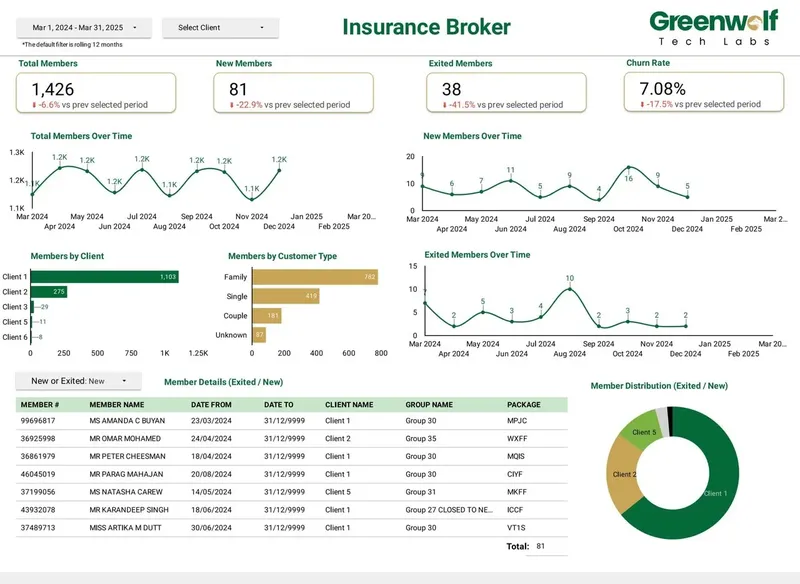
We have delivered 100+ projects for 200+ clients across 50+ locations. Where the data is messy, we automate the preparation instead of charging for it every month. For an Australian insurance brokerage receiving .xls files from multiple insurers, our pipeline cut report preparation from 4 to 5 hours to under 5 minutes and raised reporting accuracy from about 75% to 99%. If you want the running costs handled for you, our managed reporting service covers monitoring, connector fixes and changes for a predictable monthly fee, quoted after a free review.
Case study · Insurance brokerage, Australia
From 4-5 hours of spreadsheet work to a report in under 5 minutes
Monthly reports were assembled by hand from inconsistent .xls files sent by several insurers. The files now land in Google Drive, are mapped into one central sheet with the business rules applied, and feed a Data Studio dashboard.
- Report time: 4-5 hours to under 5 minutes
- Reporting accuracy: about 75% to 99%
- Visibility across insurers: limited to real time, with filters
FAQ
Frequently asked questions
Is Google Data Studio still free in 2026?
Yes. Data Studio is free for everyone who creates or views reports, with no cap on reports or viewers. Only Data Studio Pro, the optional paid edition, has a licence fee, and even then viewers need no licence.
How much is Data Studio Pro per month?
Data Studio Pro is listed at $9 per user per project per month, and the rate can vary with subscription length. You are billed for every licence in the subscription whether it is used or not. A 30-day free trial is available.
Do viewers need a Data Studio Pro licence?
No. Only people who create, edit or manage content in Pro workspaces need a licence. Clients, executives and colleagues who only view reports can do so for free, however many of them there are.
Is Looker Studio pricing different from Data Studio pricing?
No, they are the same product. Google renamed it back to Data Studio in April 2026, and the paid Pro edition carried over under the new name. Looker, without Studio, is a separate enterprise BI platform with its own pricing.
Why is my Data Studio bill higher than $9 per user?
The licence is rarely the main cost. Partner connectors for sources such as Meta, LinkedIn or Shopify, BigQuery query and storage charges, and unused Pro seats all add to the total. Check each line separately to find the driver.
Does Conversational Analytics in Data Studio cost extra?
Conversational Analytics reached general availability on July 30, 2026, and uses data agents built in BigQuery. That means BigQuery query costs apply to the questions people ask, so the same partitioning and summary-table habits that keep dashboard costs low matter here too.
Is it cheaper to use Data Studio than a paid reporting tool?
On licence cost, usually yes, because Data Studio is free. Paid client-reporting tools bundle connectors and client management, which Data Studio lacks. Compare total cost, including connectors and the time needed to onboard each client, rather than licence price alone.
Keep reading
Related pages
Get started
Tell us what your reporting has to do
Describe the dashboards you need, who reads them and where the data sits. We reply within one business day with an approach, the connectors involved and a fixed-price plan.
- Free 30-minute reporting review
- Fixed quote before any work starts
- Everything built and owned in your Google account
Prefer email? info@greenwolftechlabs.com
Get a free proposal
Two lines is enough to start.