
Comparison
Data Studio vs Looker: which Google tool does your team need?
Data Studio vs Looker comes down to one question: do you need fast, flexible reporting, or one governed definition of every metric enforced across the company? This guide is for marketing, finance and operations leaders at growing companies who have heard both names, often in the same sentence, and need to know which product to budget for. We cover what each tool is for, how each is bought, a worked cost example, the limits that push teams from one to the other, and a middle path many mid-size teams take.

Quick answer
What is the difference between Data Studio and Looker?
Data Studio is Google's free self-service reporting tool, with a Pro edition at $9 per user per project per month. Looker is Google's separate enterprise BI platform, bought on an annual contract, built around a central semantic model that a data team maintains. Choose Data Studio for fast dashboards, and Looker when governed metrics across many teams matter most.
- Data Studio is free self-service reporting; Looker is a governed enterprise BI platform sold on annual contracts.
- Looker's Standard edition caps at 50 users, so larger viewer audiences push you to Enterprise.
- Defining core metrics in BigQuery views gives many teams enough consistency without Looker.
- Pick on the governance problem you actually have, not on the product name.
Data Studio vs Looker: what is the real difference?
Data Studio is built for people who want to connect a source and see a chart today. Looker is built for organisations that want a central data team to define every metric once, in code, and have every dashboard inherit that definition. Both are Google products, both draw charts, and that is roughly where the similarity ends.
Google drew the line itself when it relaunched Data Studio under its original name. In its Google Cloud blog post of April 11, 2026, Google called the new Data Studio "the ideal choice for personal data exploration", a place for ad-hoc reports and quick visualisation across BigQuery, Google Sheets and Ads. In the same post it described Looker as its enterprise business intelligence platform for use cases that demand "trusted, governed data powered by a central semantic model".
The naming history explains most of the confusion. The product launched as Google Data Studio in 2016, became Looker Studio in October 2022 and returned to Data Studio in April 2026. For three and a half years, two different products shared the word Looker, so much of the comparison content online is really describing Data Studio under its old name. Existing reports moved over automatically, and lookerstudio.google.com now redirects to datastudio.google.com.
How do Data Studio and Looker compare side by side?
The table below compares the two on the points buyers ask us about most. The biggest practical differences are who builds the reports, where metric logic lives, and how you pay.
Read the governance row twice. In Data Studio, a calculated field such as a CASE statement that groups campaigns into channels lives inside one data source. If three teams build three data sources, you can end up with three versions of "paid social". In Looker, that logic sits in the LookML model, and every Explore and dashboard reads the same definition.
| Point | Data Studio | Looker |
|---|---|---|
| Google's positioning (April 2026) | Personal exploration and ad-hoc reporting | Enterprise BI on a central semantic model |
| Who usually builds | Marketers, analysts, finance users | A data team writing LookML, plus business users exploring |
| Where metric logic lives | Calculated fields per data source, or upstream in BigQuery | The LookML model, shared by all content |
| How you pay | Free; Pro at $9 per user per project per month | Annual contract per edition, quoted by Google sales |
| Viewers | No licence needed, even in Pro | Counted as users within the edition's limits |
| Trial | 30-day free trial of Pro | 90-day trial instance |
| Time to first dashboard | Often the same day, using native connectors | Longer, because the model comes first |
| Best fit | Marketing, ecommerce and team-level reporting | Company-wide governed metrics and embedded analytics |
How is Looker priced compared with Data Studio Pro?
Data Studio is free for creators and viewers. Data Studio Pro costs $9 per user per project per month, with the exact figure varying by subscription length, and only creators, editors and managers in Pro workspaces need a licence. Pro can be bought through the Google Cloud console or, since February 5, 2026, the Workspace Admin console.
Looker works differently. Google's Looker (Google Cloud core) documentation lists three editions, Standard, Enterprise and Embed, each purchased through an annual contract. Google does not publish a list price in that documentation, so the number comes from a sales conversation. Third-party pages quote figures, but none we read cited a source, so we do not repeat them here.
What Google does publish is the shape of each edition. Every edition includes 10 Standard users and 2 Developer users. Standard edition is aimed at small and mid-size teams and allows up to 50 users in total. Enterprise and Embed have no maximum. API allowances also differ: Standard includes 1,000 query-based API calls a month, Enterprise 100,000 and Embed 500,000, which matters if you plan to feed other tools from Looker.
| Looker edition | Included users | User limit | Typical reason to choose it |
|---|---|---|---|
| Standard | 10 Standard, 2 Developer | Up to 50 users | A single business unit with a modest audience |
| Enterprise | 10 Standard, 2 Developer | No maximum | Company-wide use, private connections, CMEK |
| Embed | 10 Standard, 2 Developer | No maximum | Analytics inside your own product, signed embedding |
Worked example: 6 report builders and 80 viewers
Take a mid-size company where 6 people build and edit reports (two in marketing, two in finance, two in operations) and 80 managers only read them. Here is how each option lands.
On Data Studio free, the licence cost is zero. If the company wants team workspaces, organisation-owned content and hourly scheduling, it moves to Pro. With all 6 builders in one Pro project, that is 6 x $9 = $54 a month, or $648 a year, and the 80 viewers need nothing. If the same 6 people edit in two separate projects, the licence count doubles to 12, so plan the project structure before buying.
On Looker, 6 builders plus 80 viewers is 86 users. That is above the 50-user limit of the Standard edition, so this company would be talking to Google about Enterprise on an annual contract. It would also need at least one person able to write and maintain LookML, because Looker content sits on top of the model. Running costs such as BigQuery storage and queries, or partner connectors for non-Google sources, apply in both cases.
The licence gap is real, but it is rarely the deciding factor. The deciding factor is whether this company has a governance problem that only a central model solves. If finance and marketing already agree on revenue and the issue is slow, manual reporting, Data Studio fixes it for a fraction of the effort.
When is Looker worth the investment?
Looker earns its cost when inconsistent numbers are damaging decisions and the organisation is large enough to staff a model. A quick test: if two departments regularly argue about whose figure is right, and that argument reaches the board, you have a governance problem rather than a dashboard problem.
- Many teams consume the same metrics and must see identical definitions everywhere.
- You have, or will hire, a data team that can own a LookML model with version control.
- You need embedded analytics inside your own product for customers, which the Embed edition targets.
- Your audience is large and you need to separate people who explore data from people who only view dashboards, which Looker's Developer, Standard and Viewer user types are designed for.
- Other systems will pull governed data through the Looker API at volume.
When is Data Studio the better choice?
Data Studio is the better choice when speed, cost and flexibility matter more than central control. It connects natively to GA4, Google Ads, Search Console, Sheets, BigQuery, YouTube, Campaign Manager 360, Display & Video 360, Ad Manager, Cloud SQL, MySQL, PostgreSQL, SQL Server and Redshift, and partner connectors add hundreds more.
It suits marketing teams reporting multi-channel spend and leads, ecommerce brands tracking revenue and conversion, agencies producing client reports, and finance or operations teams that want one live view instead of a monthly spreadsheet. Pro adds what growing companies usually ask for: organisation-owned content tied to Cloud projects, team workspaces, up to 200 delivery schedules per report, Slack and Google Chat delivery, alerts and audit logging.
Be clear about its limits before you commit, because these are the points where teams start asking about Looker.
- Blends join at most 5 data sources, with equality joins only, and live inside a single report.
- Tables on fixed-schema sources such as GA4 and Google Ads cap at 10 dimensions and 20 metrics.
- GA4 Data API quotas (14,000 tokens per project per property per hour on standard properties) can cause errors on busy reports.
- Calculated fields are defined per data source, so metric definitions can drift between reports.
- There is no warning when a connector breaks, so someone has to monitor it.
Is there a middle path between Data Studio and Looker?
Yes, and it is where most mid-size companies we talk to end up. Define the core metrics once in BigQuery, as views or scheduled tables, and build every Data Studio report on those tables instead of on raw connectors. Revenue, margin, qualified lead and active customer then mean the same thing in every dashboard, without a Looker contract or a LookML specialist.
This approach also removes several Data Studio limits at once. Joins happen in SQL rather than in 5-source blends, flexible-schema BigQuery sources allow up to 100 dimensions and 100 metrics in a table, and dashboards stop hitting GA4 quotas because they read stored data. Partitioning tables by date keeps query costs small.
It is not a full semantic layer. There is no single model that every tool must pass through, and discipline matters: reports should read from the approved views, not from ad-hoc sources. For a company with a few hundred viewers and a handful of builders, that trade-off is usually acceptable. If you later outgrow it, the clean BigQuery tables are exactly what a Looker model would sit on, so the work is not wasted.
How do the AI features differ between Data Studio and Looker?
Both products now let people ask questions in plain language, but they rely on different foundations. In Data Studio, Conversational Analytics became generally available on July 30, 2026. Data agents are built in BigQuery and published to Data Studio, so answer quality depends on how well the underlying BigQuery tables are modelled and described.
Google describes Looker's agentic capabilities as aimed at use cases that demand governed data powered by a central semantic model. In practice, the semantic model gives an AI agent named, defined metrics to work with. Data Studio teams get a similar benefit by doing the modelling in BigQuery first, which is one more reason the middle path above is worth considering. Gemini in Data Studio is part of the Pro edition.
What mistakes do teams make when choosing between them?
Most poor choices come from treating this as a feature comparison instead of a problem diagnosis. These are the mistakes we see most often.
- Reading a pre-2026 comparison and assuming the free tool is a cheaper edition of Looker. It is a different product with a different job.
- Buying Looker to fix slow manual reporting, when the real cause is messy source files that need a pipeline.
- Staying on Data Studio while three departments publish three revenue figures, and hoping more dashboards will settle it.
- Ignoring the viewer count: an audience above 50 users rules out Looker's Standard edition.
- Budgeting for licences but not for modelling, whether that is LookML in Looker or BigQuery views under Data Studio.
- Choosing a tool before agreeing which decisions the dashboards must support.
How does Greenwolf Tech Labs help teams decide?
We build in Data Studio and design BigQuery warehouses behind it, so we are open about our angle: we do not sell or implement Looker. That is why we start with a free review of your sources, your audience and the arguments people have about numbers today, and we will tell you if your situation genuinely calls for Looker.
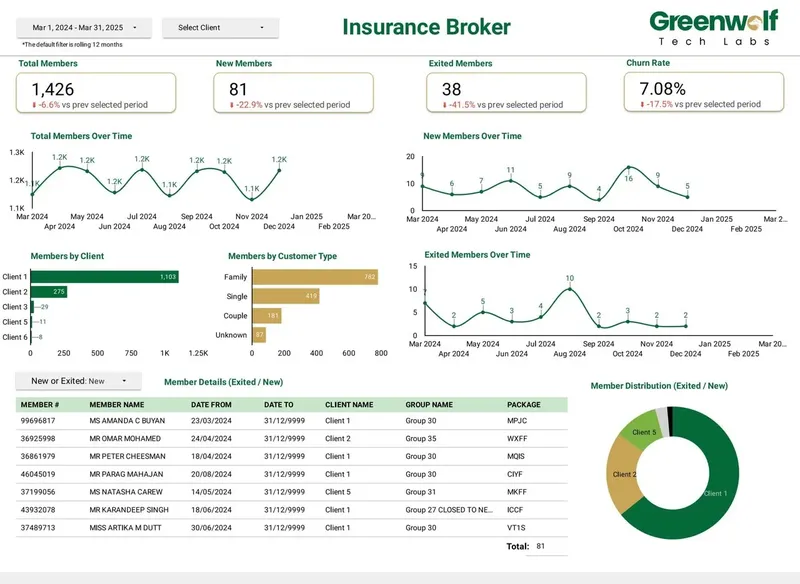
When Data Studio is the right fit, our team models the core metrics in BigQuery, builds the dashboards on top and hands ownership to your company account. For an Australian insurance brokerage working from messy insurer spreadsheets, our automated pipeline cut report preparation from 4 to 5 hours to under 5 minutes and lifted reporting accuracy from about 75% to 99%. Across 100+ projects for 200+ clients, the pattern is the same: the data layer decides whether reporting can be trusted, whichever tool draws the charts.
Case study · Insurance brokerage, Australia
From 4-5 hours of spreadsheet work to a report in under 5 minutes
Monthly reports were assembled by hand from inconsistent .xls files sent by several insurers. The files now land in Google Drive, are mapped into one central sheet with the business rules applied, and feed a Data Studio dashboard.
- Report time: 4-5 hours to under 5 minutes
- Reporting accuracy: about 75% to 99%
- Visibility across insurers: limited to real time, with filters
FAQ
Frequently asked questions
Is Data Studio the same as Looker?
No. Data Studio is Google's free self-service reporting tool, formerly called Looker Studio. Looker is a separate enterprise BI platform built around a central semantic model written in LookML and bought on an annual contract.
Is Looker Studio the same as Looker?
No. That was the name of Data Studio between October 2022 and April 2026, when Google renamed it back. It was never an edition of Looker, and existing reports moved to Data Studio automatically with no action needed.
How much does Looker cost compared to Data Studio?
Data Studio is free, and Data Studio Pro is $9 per user per project per month with no charge for viewers. Looker editions are sold through annual contracts, and Google does not publish list prices in its edition documentation, so you need a quote from Google's sales team.
Can Data Studio replace Looker?
For team-level reporting, often yes, especially if core metrics are defined in BigQuery views. It cannot replace a governed semantic layer across many tools, or embedded analytics inside your own product at scale.
Do I need BigQuery to use Looker or Data Studio?
Data Studio works without BigQuery through native connectors such as GA4, Google Ads and Sheets. Looker queries a SQL database, so you need a warehouse such as BigQuery behind it. Many Data Studio teams add BigQuery later to centralise metrics and avoid connector limits.
Can a company use Data Studio and Looker together?
Yes. Some companies run Looker for governed company-wide metrics and let teams use Data Studio for quick, ad-hoc reports. The key is agreeing which numbers are official and where they come from.
Which is better for marketing reporting, Data Studio or Looker?
Data Studio is usually better for marketing reporting because it connects natively to GA4, Google Ads, Search Console and YouTube, and partner connectors cover Meta and LinkedIn. Looker suits marketing only when it sits inside a wider governed data programme.
Keep reading
Related pages
Get started
Tell us what your reporting has to do
Describe the dashboards you need, who reads them and where the data sits. We reply within one business day with an approach, the connectors involved and a fixed-price plan.
- Free 30-minute reporting review
- Fixed quote before any work starts
- Everything built and owned in your Google account
Prefer email? info@greenwolftechlabs.com
Get a free proposal
Two lines is enough to start.